Step 1 – Set up Docker repository
The easiest way to start an instance of ONLYOFFICE Document Server is to use Docker. Before you install Docker on a new host machine, you need to set up the Docker repository:
curl -fsSL https://get.docker.com -o get-docker.sh
sh ./get-docker.sh --dry-run     # Check which steps this script will run
sh ./get-docker.sh
Step 2 – Install ONLYOFFICE Document Server
Run Docker and execute the following command to install ONLYOFFICE Document Server and all the dependencies:
sudo docker run -i -t -d -p 80:80 --restart=always onlyoffice/documentserverNow your ONLYOFFICE Docs should be available at http://server_ip.
Step 3 – Switch to HTTPS using certbot
The easiest way to switch ONLYOFFICE Docs to HTTPS is to automatically get Let’s Encrypt SSL Certificates using certbot.
Run the ONLYOFFICE Docs Docker container specifying ports 80 and 443 and setting your own values for the variables.
Aktuelle Docker-Container-ID von OnlyOffice herausfinden:
docker psAktuellen Container stoppen:
docker stop containeridOnlyOffice-Container mit Let’s Encrypt Zertifikat installieren / starten:
sudo docker run -i -t -d -p 80:80 -p 443:443 --restart=always \
    -e LETS_ENCRYPT_DOMAIN=example.com -e LETS_ENCRYPT_MAIL=email@example.com onlyoffice/documentserver
Where:
LETS_ENCRYPT_DOMAIN– a domain name to use for the certificate -> die Domain des Servers, auf der OnlyOffice läuft. Z.B. office.meinedomain.deLETS_ENCRYPT_MAIL– an email used for registration and recovery contact.
Step 5 – Configure ONLYOFFICE within Nextcloud
- Click your user icon in the upper right corner
- Switch to
Admninistration settingsand go to theONLYOFFICEpage
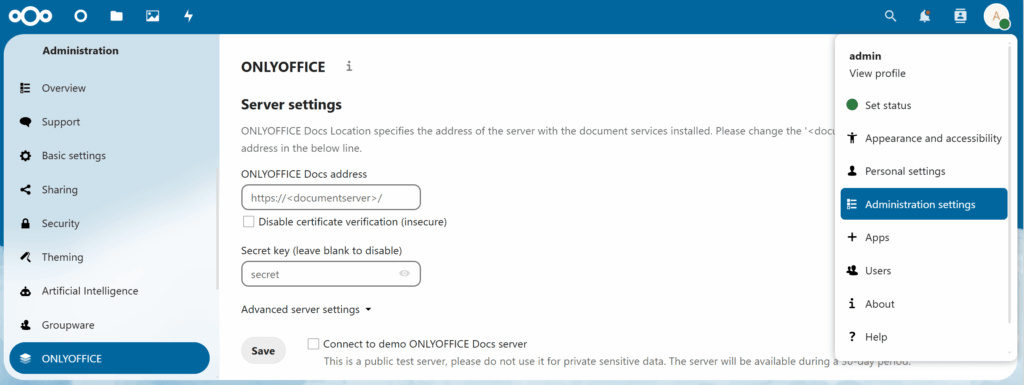
Where:
ONLYOFFICE Docs address– die Domain des Servers, auf der OnlyOffice läuft. Z.B. office.meinedomain.deSecret key (leave blank to disable)– zu finden auf dem OnlyOffice Server – siehe unten den nächsten Schritt.
ONLYOFFICE Docs config file:
This tutorial used Docker to install the ONLYOFFICE Documentation Server.
For this reason, you have to access the ONLYOFFICE Docs Docker container to view the config file:
docker container ls
docker exec -it <container-id> /bin/bash
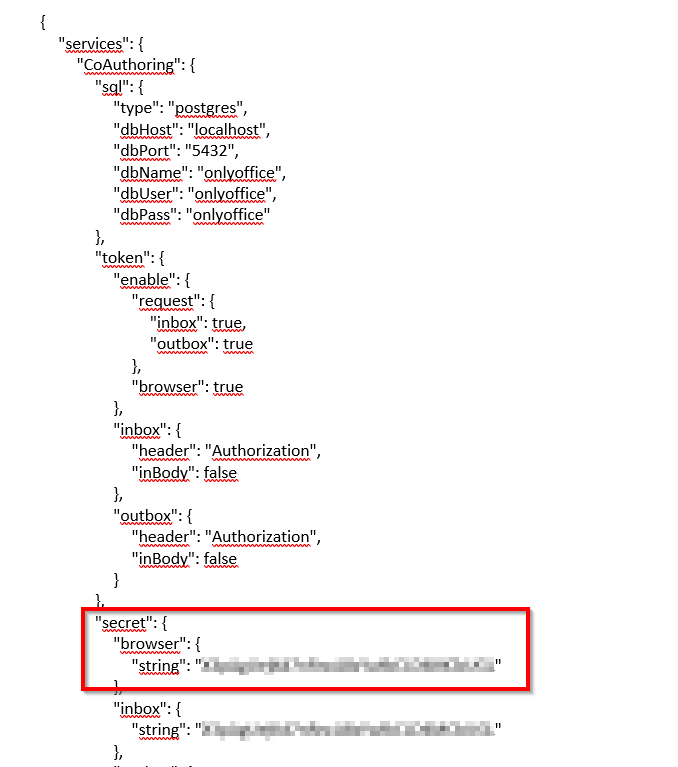
cat /etc/onlyoffice/documentserver/local.json
In der Ausgabe ziemlich oben, hier:
Quelle:
https://community.hetzner.com/tutorials/install-and-configure-onlyoffice-docs-for-nextcloud