Installation auf Synology NAS
Nachfolgend das Docker Compose-File für die Installation und Nutzung von Jellyfin.
services:
  jellyfin:
    image: jellyfin/jellyfin
    container_name: jellyfin
    # Optional - specify the uid and gid you would like Jellyfin to use instead of root
    # user: uid:gid
    user: 1037:100
    ports:
      - 8096:8096/tcp
      - 7359:7359/udp
    volumes:
      # - /path/to/config:/config
      - /volume1/docker/jellyfin/config:/config
      # - /path/to/cache:/cache
      - /volume1/docker/jellyfin/cache:/cache
      - type: bind
       # source: /path/to/media
        source: /volume2/Mediathek 2
        target: /media
        read_only: true
      - type: bind
       # source: /path/to/media2
        source: /volume1/Mediathek 1
        target: /media2
        read_only: true
      # Optional - extra fonts to be used during transcoding with subtitle burn-in
      #- type: bind
       # source: /path/to/fonts
       # target: /usr/local/share/fonts/custom
       # read_only: true
    restart: 'unless-stopped'
    # Optional - alternative address used for autodiscovery
    environment:
      - JELLYFIN_PublishedServerUrl=http://example.com
    # Optional - may be necessary for docker healthcheck to pass if running in host network mode
    extra_hosts:
      - 'host.docker.internal:host-gateway'
user: uid:gid muss bei einem Synology NAS per SSH herausgefunden werden:

Tipp: Eigenen Benutzer „jellyfin“ anlegen und auf die entsprechenden Media-Ordner Lesezugriff geben.
Sollte der Container nicht starten, könnte dies an der WebStation liegen.
Bei mir hatte der Container Manager automatisch auf der WebStation einen entsprechenden Eintrag für Port 8096 gesetzt.
Dieser war nicht nötig – und hatte sogar den Start des Containers verhindert.
Installation auf UGREEN NAS
Nachfolgend das Docker Compose-File für die Installation und Nutzung von Jellyfin.
services:
  jellyfin:
    image: jellyfin/jellyfin
    container_name: jellyfin
    # Optional - specify the uid and gid you would like Jellyfin to use instead of root
    # user: uid:gid
    user: 1000:10
    ports:
      - 8096:8096/tcp
      - 7359:7359/udp
    volumes:
      # - /path/to/config:/config
      - /volume1/docker/jellyfin/config:/config
      # - /path/to/cache:/cache
      - /volume1/docker/jellyfin/cache:/cache
      - type: bind
       # source: /path/to/media
        source: /volume1/docker/jellyfin/media
        target: /media
        read_only: true
      # - type: bind
       # source: /path/to/media2
       # target: /media2
       # read_only: true
      # Optional - extra fonts to be used during transcoding with subtitle burn-in
      #- type: bind
       # source: /path/to/fonts
       # target: /usr/local/share/fonts/custom
       # read_only: true
    restart: 'unless-stopped'
    # Optional - alternative address used for autodiscovery
    environment:
      - JELLYFIN_PublishedServerUrl=http://example.com
    # Optional - may be necessary for docker healthcheck to pass if running in host network mode
    extra_hosts:
      - 'host.docker.internal:host-gateway'
user: uid:gid muss bei einem UGREEN NAS per SSH herausgefunden werden:
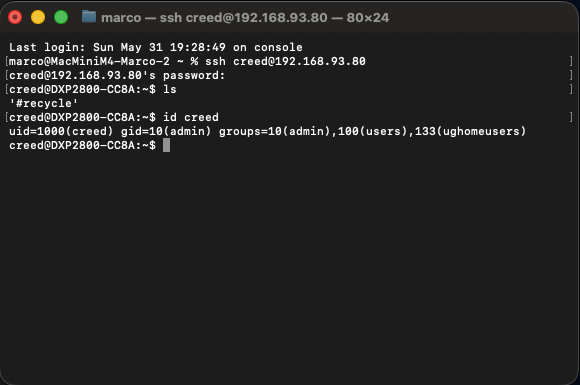
Die UID ist also 1000 und GID 10 (admin-Gruppe).